Self-hosted security tool

Most tools hide
the noise.
SignalTrace makes it visible.

SignalTrace Tracking & Analysis is a self-hosted honeypot and tracking platform that scores every request, explains every classification, and helps you correlate activity across links and pixels. It runs on Docker or bare metal with no external services required.

Open Source Self-Hosted Grafana Splunk Docker Threat Intel
Request Score
BOT< 25
SUSPICIOUS25–59
UNCERTAIN60–74
HUMAN≥ 75
203.0.113.10 Chrome/Win10 human
198.51.100.25 curl/7.81 bot
192.0.2.50 Python-urllib suspicious

See what is really hitting your infrastructure

SignalTrace helps you capture requests, score suspicious traffic, generate threat feeds, and send the data where it needs to go.

Explainable Scoring
Every request gets a 0 to 100 score with named reasons behind the decision. You can see how headers, user agents, ASN rules, and behavioral signals pushed traffic toward bot, suspicious, or human.
Tracked Links, Pixels, and Campaigns
Create tracked URLs and pixel endpoints with ready-to-use deployment templates (HTML, markdown, email-safe buttons). Each hit is logged with full request detail and per-token alerting.
Threat Feed Export
Generate threat feeds in plain text, Nginx deny, iptables, CIDR, MISP, and STIX 2.1 formats. Drop suspicious addresses directly into firewalls, block lists, and threat intelligence platforms.
Overrides and Rules
Block or allow specific IPs, apply country penalties, and tune how traffic is scored. Hide noisy-but-known IPs from the dashboard without affecting logging or scoring — traffic is still captured, just suppressed from the default view.
IP Reputation
Every source IP is automatically enriched with Shodan InternetDB (open ports, CVEs, tags — no API key) and AbuseIPDB (abuse confidence score, report history — optional free key). Cached on first sight, visible in the event details panel.
Webhook and Email Alerts
Send alerts to Teams, PagerDuty, Slack, or your own endpoint using platform preset templates or a custom payload. An inline test button confirms delivery before you go live. Email alerting supports per-token notifications.

See SignalTrace in 40 seconds

A quick look at how SignalTrace scores traffic, surfaces suspicious behavior, and gives you control. When you are ready, jump into the live demo and explore the rest yourself.


Deeper visibility where you need it

SignalTrace includes ready-to-use dashboards for both Splunk and Grafana so you can move from raw hits to reporting without building anything from scratch.

SOC Overview Splunk SOC Overview Dashboard
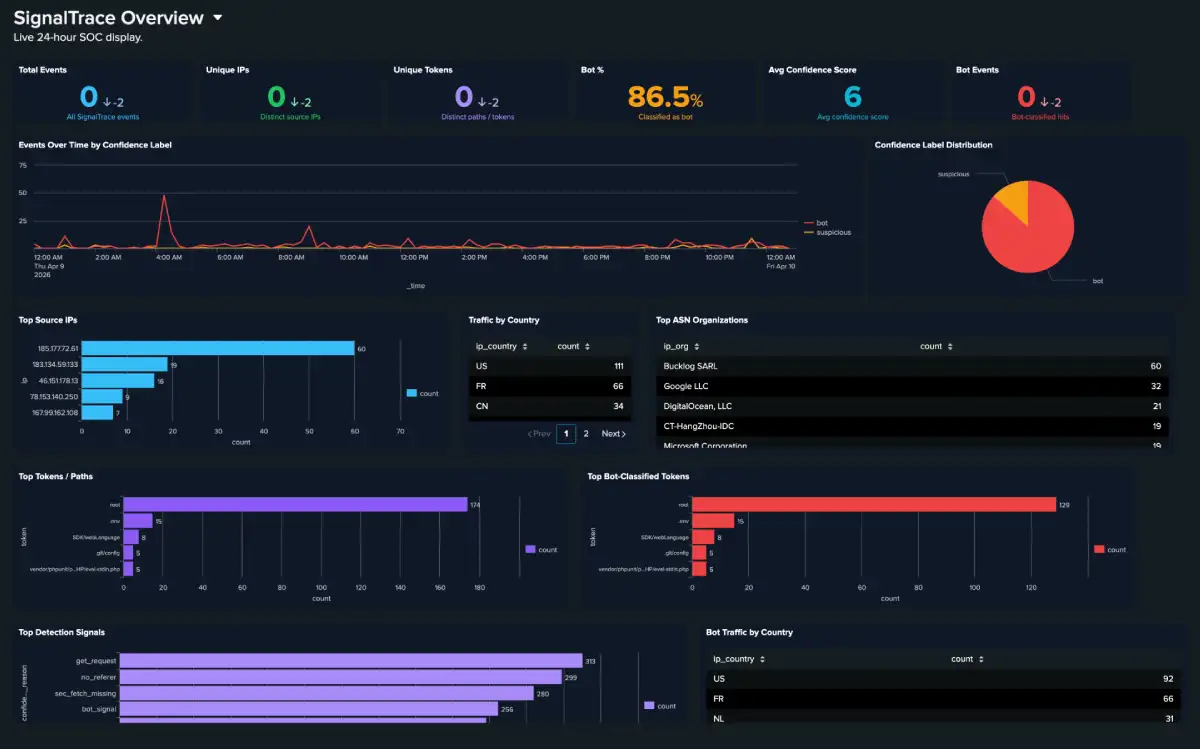
A 24 hour tactical view for SOC displays. Track bot ratios, top ASNs, detection signals, behavioral hits, and geographic patterns as traffic comes in.

Event Investigation Splunk Investigation Dashboard
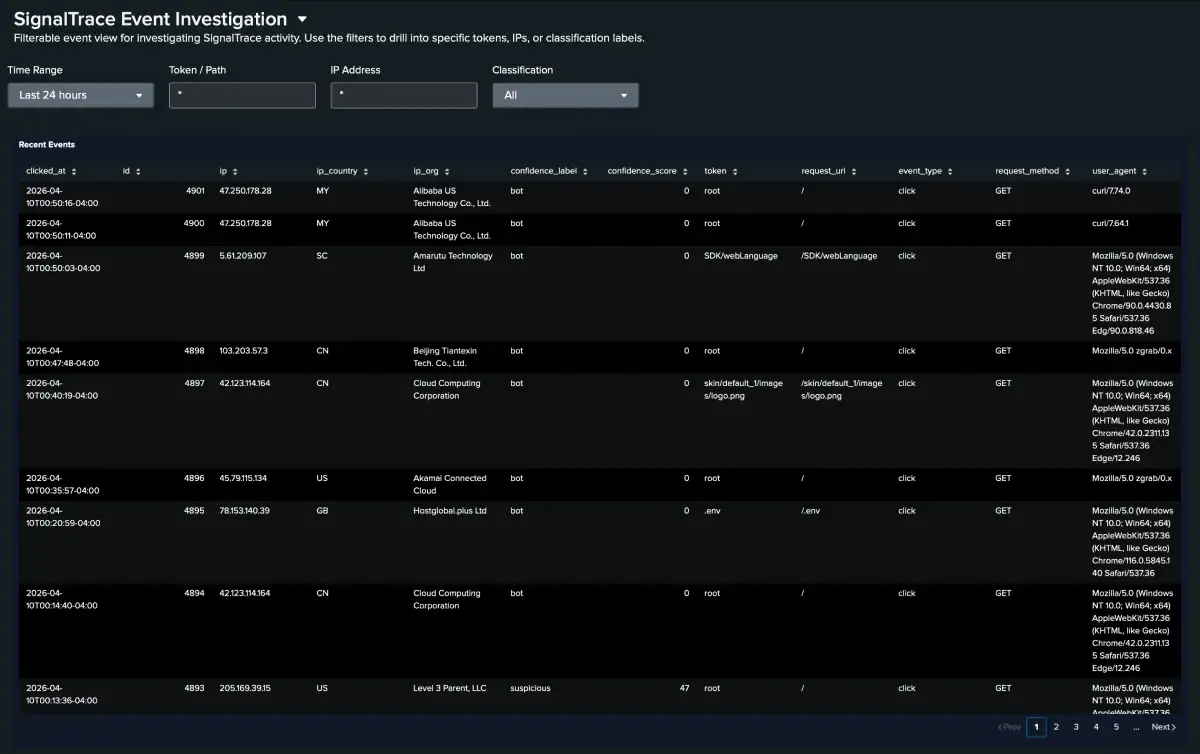
Pivot from trends to specifics. Filter by token, IP, classification, country, or detection signal to drill into exactly how a source interacted with your tracked paths.

Grafana Dashboard Grafana SignalTrace Dashboard
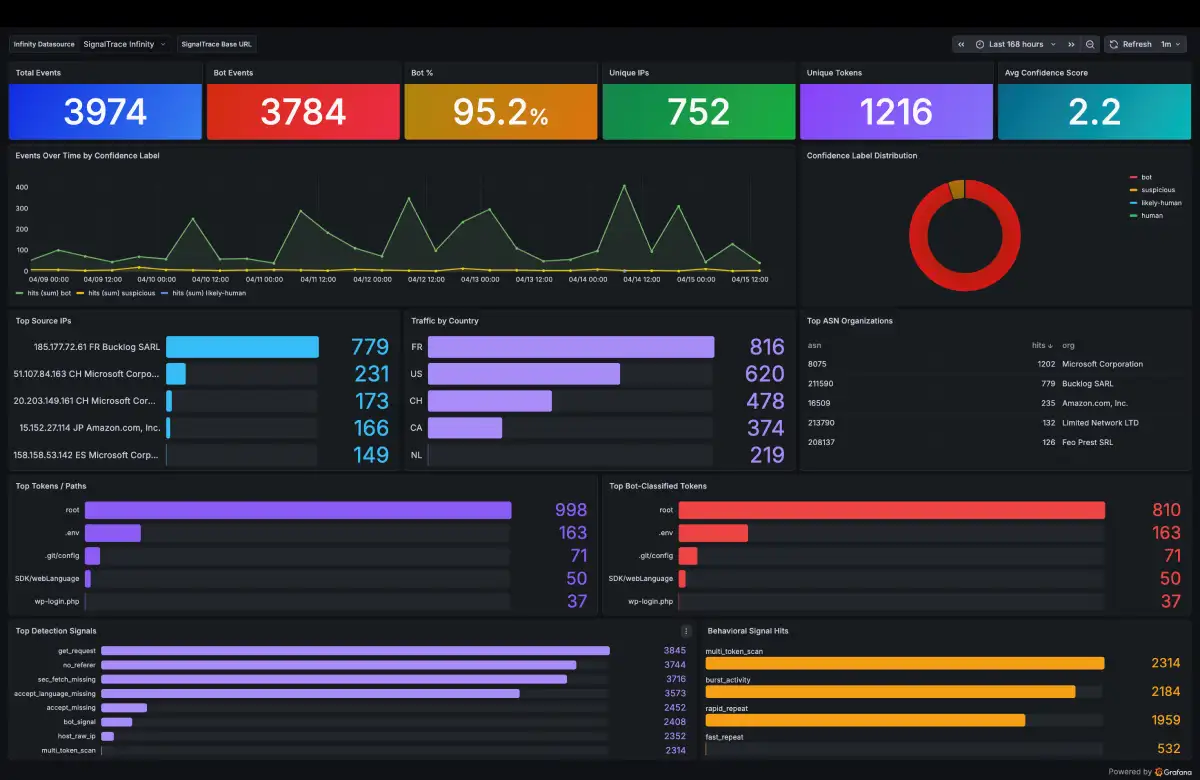
A pre-built Grafana dashboard using the Infinity datasource. Stat panels, confidence distribution, top IPs and countries, and a live events table — no transformations required.


Operational detail and strategy

Beyond the code, the documentation covers deployment, tuning, and practical guidance for running SignalTrace in production.

Reference Scoring Reference

A full reference for scoring signals, point values, and examples of how scores are calculated. Includes country rules and override behavior.

Core Concepts Campaigns

Group tokens into a single operational context for filtering, correlation, aggregated metrics, and webhook fallback behavior.

Integration MISP & STIX Export

Export enriched threat indicators in MISP event format or STIX 2.1 bundle format for consumption by threat intelligence platforms. Covers authentication, field mapping, and confidence scoring.

Integration Threat Feed Integration

See how to use the available feed formats with iptables, Nginx, pfSense URL table aliases, fail2ban, and related tooling.

Deployment Wildcard DNS Honeypot

Capture traffic to any subdomain of your domain using a wildcard DNS record. Covers Apache vhost configuration, wildcard TLS, and subdomain visibility in the dashboard.

Integration Webhook Integration

Send bot alerts to Slack, Discord, Teams, PagerDuty, or custom endpoints. Includes platform preset templates, an inline test button, payload template syntax, and deduplication behavior.

Integration Grafana Integration

Set up the Infinity datasource, import the 16-panel dashboard, and configure Bearer token authentication. Covers all nine aggregation endpoints and Nginx header passthrough.

Integration IP Enrichment

Automatic enrichment with Shodan InternetDB and AbuseIPDB. Covers caching behavior, the IP Reputation panel, API key setup, daily limits, and rescanning stale results.

Reference IP Overrides & Country Rules

Block, allow, or hide specific IPs independently of scoring. Covers all three override modes, the hide-from-dashboard flag, country penalty rules, and how they interact with the scoring pipeline.

Explore the Full Wiki →

What to explore next

The video gives you the quick overview. The live demo lets you dig into the details with real traffic and working controls.

Explore the Activity Feed
Start on the Dashboard to watch hits arrive in real time. Click an IP to see requests from that source, click a token to filter by path, and open Details to view the full score breakdown.
Read the Score Reasons
Open a Details panel and look at the scoring section. The reason field shows the signals that shaped the score, including missing headers, spoofed user agents, country penalties, and more.
Explore Campaigns
Visit the Campaigns tab to see how multiple tokens can be grouped into a single scenario with shared metrics, filtered activity, and streamlined investigation.
Check the Threat Feed
Open Settings and scroll to the threat feed section. View the live IP count and copy feed endpoints in plain text, Nginx, iptables, CIDR, MISP, or STIX 2.1 formats.
Try an IP Override
Go to the IP Overrides tab and add a block, allow, or hide rule for an address. Block and allow pin the classification; hide suppresses the IP from the dashboard while still logging and scoring all traffic from it.
Add a Country Rule
Go to Country Rules and add a penalty for a country code. New requests from that location will reflect the rule in the score and reason field.

Try it with live traffic

The demo is running on a real SignalTrace instance and resets every 60 minutes.

Username
demo
Password
trysignaltrace
Open Live Demo →

No account needed · Resets hourly · Live traffic


Run your own copy

SignalTrace is MIT licensed and fully open source. You can run it on a fresh Ubuntu server or in Docker with only a small amount of setup.

View on GitHub →